

Clear communication is essential for businesses that rely on phone calls, online meetings, and customer support. Whether employees work in a traditional office or from home, having reliable audio equipment can make daily tasks easier. A suitable headset helps users communicate comfortably, listen to conversations clearly, and manage calls without unnecessary interruptions.
Wired headsets remain a practical choice for many workplaces because they provide a direct connection to compatible devices without requiring battery charging. Businesses looking for dependable communication equipment often consider USB headsets for their simplicity, comfort, and everyday usability.
Why USB Wired Headsets Are Useful
USB headsets are commonly used by office employees, customer service representatives, remote workers, and professionals who attend frequent virtual meetings. They connect directly to compatible computers or communication devices, making setup straightforward.
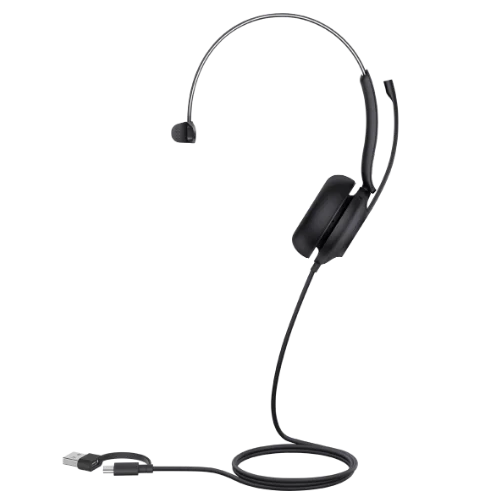
Businesses interested in this model can explore the Yealink UH35 USB wired headset to review its available configurations and features.
A wired connection can also be convenient for shared workstations and office environments where employees need equipment that is easy to connect and use. Before purchasing a headset, however, it is important to confirm that its connector and software compatibility match the intended device.
Important Features to Consider
Choosing the right headset involves more than looking at its appearance. Audio quality, microphone performance, comfort, and call controls all contribute to a better communication experience.
Clear Audio and Noise Reduction
A quality microphone helps transmit speech clearly during online meetings and customer conversations. Some professional headsets use multiple microphones and noise-reduction technology to reduce unwanted background sounds picked up during calls.
This can be particularly useful in busy offices where people are talking nearby. However, microphone noise reduction does not eliminate every surrounding sound, so the working environment still matters.
Comfortable Design for Daily Use
Professionals who wear headsets for several hours need a design that feels comfortable. Lightweight construction, adjustable headbands, and soft ear cushions can make a difference during extended work sessions.
Users should also consider whether they prefer a mono headset with one ear uncovered or a dual-ear model. A mono design allows greater awareness of surrounding conversations, while a dual-ear design provides audio through both ears.
Convenient Call Controls
Built-in buttons for volume adjustment and microphone muting can simplify daily communication. Some headsets also support answering, ending, or holding calls when used with compatible devices and applications.
These controls help employees manage conversations without repeatedly switching between software windows.
Getting to Know the Yealink UH35 USB Wired Headset
The Yealink UH35 is a professional USB headset designed for office communication, remote working, and online meetings. It features dual microphones with noise-reduction technology, 35 mm speakers, and an adjustable microphone boom.
Its lightweight construction and soft ear cushions support comfortable everyday use. The integrated busylight can indicate when a user is on a call or help signal that they do not want to be interrupted.
The UH35 is available in mono and dual configurations, allowing users to select the wearing style that suits their working environment. Different versions are also available for Microsoft Teams and unified communications platforms.
Wired Headsets for Offices and Remote Teams
Different working environments have different communication needs. In a call center, employees may need a comfortable headset with clear microphone performance and convenient call controls. In a home office, users may prioritize lightweight construction and compatibility with their computer.
For businesses with shared workstations, wired USB headsets can simplify equipment setup because employees do not need to pair Bluetooth devices each time they begin working.
Before choosing a model, businesses should check the connector type, operating system requirements, and compatibility with their calling platform. Some headset versions use USB-C connections with a USB-A adapter, while other configurations may differ.
How to Choose the Right Headset
Start by identifying how the headset will be used. Employees who spend most of their day on calls may benefit from comfortable ear cushions and effective microphone noise reduction. People who frequently switch between meetings and other computer tasks may appreciate accessible call controls.
Next, consider the environment. A busy office may require better microphone noise handling, while a quiet home workspace may need fewer specialized features.
Finally, check the product specifications and confirm compatibility before ordering. Businesses purchasing headsets for multiple employees should compare wearing styles, connection options, warranty coverage, and overall budget.
Testing a sample before making a large purchase can also help employees assess comfort and usability.
Conclusion
Professional USB headsets can support clearer communication, convenient call management, and comfortable daily work. Features such as microphone noise reduction, lightweight construction, and integrated controls are useful for employees who regularly participate in calls and online meetings.
By evaluating workplace requirements and checking device compatibility, businesses can choose headsets that suit their teams. The Yealink UH35 is one option for professionals seeking a wired communication headset for office or remote use.
 Sky Bloom IT